

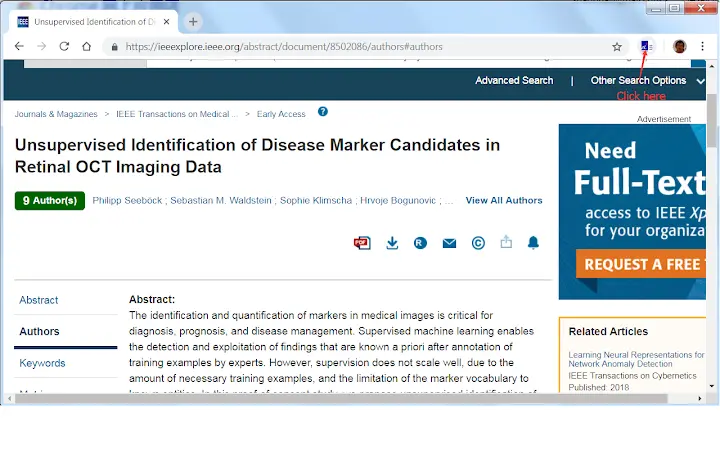
Description
Streamline Academic Research with AStar Proxy
Overview
The AStar Academic Library Proxy extension is designed to simplify access to scholarly resources for researchers, students, and academic professionals affiliated with AStar. By integrating directly with supported publishers, the tool enables seamless navigation to subscription-based content through the institution’s proxy system. Users are prompted to log in with their internal AStar account, ensuring secure and authorized access to restricted materials.
It is particularly useful in environments where institutional access is required to view full-text articles, conference proceedings, or technical journals. The extension automatically detects whether the current URL belongs to one of the supported publishers, such as IEEE, Springer, ScienceDirect, or Nature. If the domain matches, the proxy connection is initiated; otherwise, no action is taken, preventing unnecessary interference.
Target users include university researchers, graduate students, and technical staff who regularly access academic databases. The extension is part of a broader institutional effort to provide efficient, secure, and centralized access to digital research assets. While the developer is identified as AStar, no additional organizational background was provided in the available data.
Key Features & Capabilities
- Automatic Proxy Activation – The extension detects URLs from supported academic publishers and triggers the proxy connection without manual input.
- Secure Login Integration – Requires authentication via the user’s AStar internal account, ensuring only authorized users gain access.
- Domain-Based Filtering – Only processes requests from a predefined list of publisher domains, minimizing false triggers.
- Minimal User Interaction – Once installed and logged in, the extension operates in the background with no ongoing user input required.
- Support for Major Academic Publishers – Compatible with platforms including IEEE, ACM, Springer, ScienceDirect, Nature, Wiley, and others.
For example, when a researcher navigates to a paper hosted on sciencedirect.com, the extension recognizes the domain and routes the request through the AStar proxy. This allows immediate access to the full article without needing to manually enter proxy links. Similarly, a student reading a journal on nature.com benefits from automatic redirection, streamlining the research workflow.
User Interface, Workflow & Performance
The extension operates as a browser add-on with a minimal user interface. It displays an icon in the browser toolbar, which may indicate connection status or require login. No additional menus or configuration panels were detailed in the provided information.
Workflow efficiency is high for users already familiar with the AStar system. After installation and login, the extension functions transparently, requiring no further action during normal browsing. The user experience is designed to be non-intrusive, with no visible changes unless a supported publisher is accessed.
Performance details were not specified by the developer. However, based on standard browser extension behavior, the extension is expected to have low latency and minimal impact on browser performance. Resource usage, including CPU and RAM consumption, was not disclosed. Stability is assumed to be consistent with typical browser extensions, though no real-world testing data was provided.
Compatibility & System Requirements
The extension is compatible with Windows and Mac operating systems. It is designed for use in modern web browsers that support extensions, though specific browser names were not listed.
The installation size is 1.5 MB, which is typical for lightweight browser tools. The software version is 1.0, indicating a stable initial release. No specific hardware requirements were provided, and the developer did not specify minimum system specifications.
Exact system requirements were not listed. Compatibility information was partially provided, focusing only on OS platforms. Users should ensure their browser supports extension installations and has enabled the necessary permissions for the AStar proxy tool to function properly.
Pros and Cons
Pros
- Seamless access to academic journals via institutional proxy
- Supports a wide range of major publishers
- Automated process reduces manual steps
- Secure login using internal AStar credentials
- Small file size, lightweight operation
Cons
- Only works with a predefined list of publishers
- No detailed documentation or user guide provided
- Dependent on institutional login credentials
- Limited to Windows and Mac platforms
- Browser-specific behavior may vary without further details
FAQ Section
Is the AStar Academic Library Proxy extension free to use?
Yes, the extension is available at no cost. It is provided by AStar as part of its academic support services.
Which browsers are supported?
The extension is compatible with Windows and Mac operating systems. Specific browser compatibility was not detailed in the provided information.
Do I need to log in every time I use the extension?
Users must log in with their AStar internal account. The session persistence depends on browser behavior and the extension’s internal state, which was not specified.
Can I use this tool outside the AStar network?
Yes, the extension enables access to institutional resources from external locations, as long as the user is authenticated with their AStar account.
How do I update the extension?
Updates are typically managed through the browser’s extension store. The latest version is 1.0, released on May 15, 2024.
Final Thoughts
The AStar Academic Library Proxy extension offers a focused, efficient solution for researchers and students needing reliable access to academic publications. Its automatic detection of publisher domains and integration with institutional login credentials significantly reduce friction in accessing premium content. While it is limited to a specific set of publishers and lacks detailed documentation, its lightweight design and seamless operation make it a valuable tool for its intended audience.
For those affiliated with AStar and regularly engaging with scholarly databases, this extension streamlines workflows and enhances productivity. It represents a practical, no-frills utility that delivers on its core promise: secure, instant access to academic resources.
Download AStar Academic Library Proxy now
Guides & Tutorials for AStar Library Proxy Extension for Chrome
How to install AStar Library Proxy Extension for Chrome
- Click the Preview / Download button above.
- Once redirected, accept the terms and click Install.
- Wait for the AStar Library Proxy Extension for Chrome download to finish on your device.
How to use AStar Library Proxy Extension for Chrome
This software is primarily used for its core features described above. Open the app after installation to explore its capabilities.
User Reviews for AStar Library Proxy Extension for Chrome 0
No reviews found





